

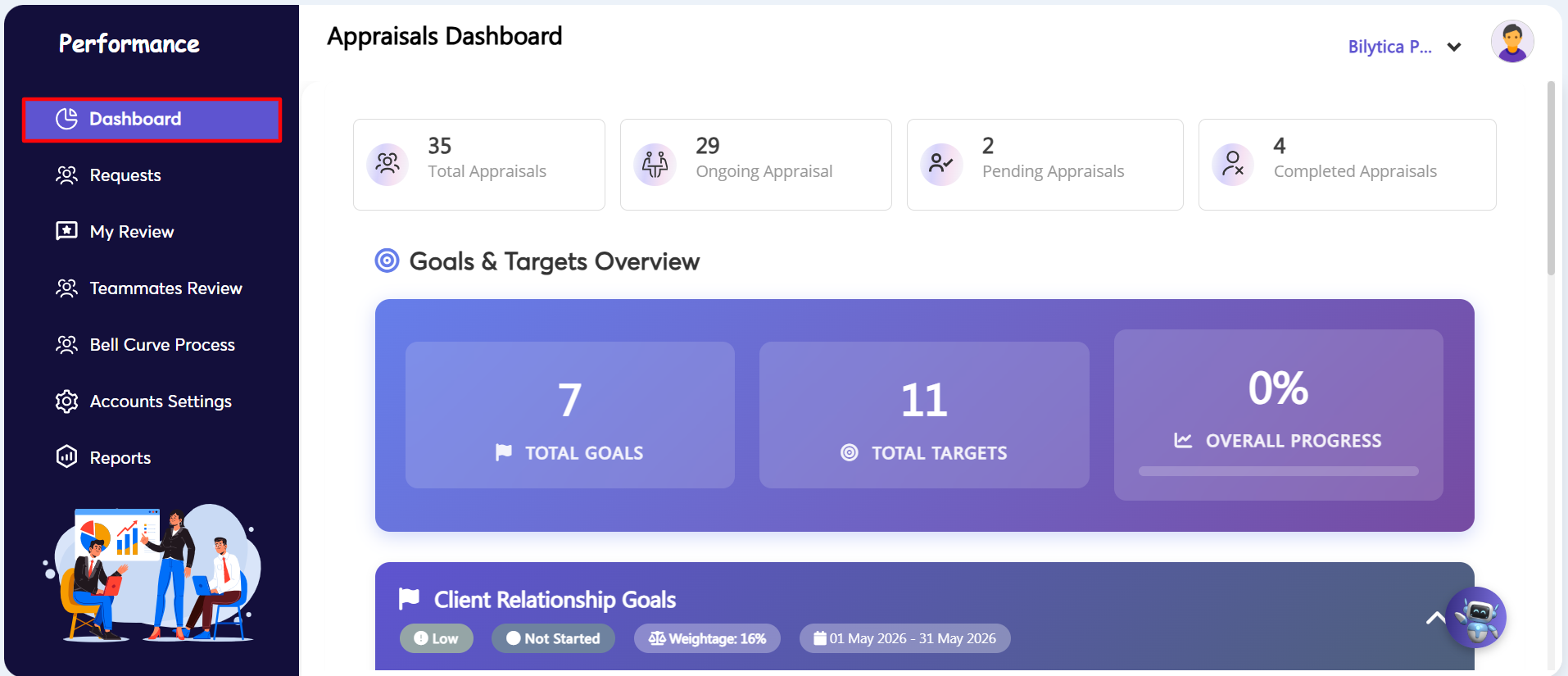
The Appraisals Dashboard displays your personalized performance metrics through three main sections:
Operational Progress Cards
Located at the top of the page, these cards track the status of current review cycles:
- Total Appraisals: The total number of evaluation sheets created.
- Ongoing Appraisals: Active reviews currently in progress.
- Pending & Completed Appraisals: Reviews currently waiting for input or finalized by HR.
Goals & Targets Overview Banner
Positioned right below the cards, this section shows your total Objective Key Results (OKRs):
- Total Goals & Targets: The base number of main objectives assigned to your profile.
- Overall Progress Percentage: A scannable percentage bar showing your cumulative progress (e.g., 0% Overall Progress).
Granular Objective Tracking Slabs
Scroll down to see individual goal cards (like Client Relationship Goals) detailing your specific milestones:
- Priority & Status: Color-coded tags showing urgency (e.g., Low) and active status (e.g., Not Started).
- Weight & Timelines: Displays the goal’s impact weight (e.g., Weightage: 16%) and target date range (e.g., 01 May 2026 - 31 May 2026) so you can plan your focus areas.
OKR Optimization Pro-Tip: |