

Paypeople Mobile App

Getting Started

7 min read Official Workflow Click any image to enlarge

How Do I Log-In into PayPeople App?

  • First, open the PlayStore, and install this app from Playstore.
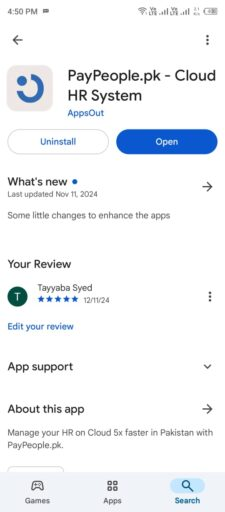
Getting Started: How Do I Log-In into PayPeople App? (screen 1)

  • Open the PayPeople App. Click on Sign-In and enter your username and password, and click the Sign-in button on PayPeople App.
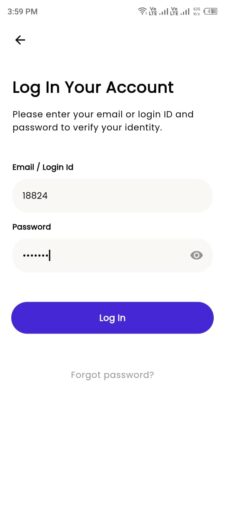
Getting Started: How Do I Log-In into PayPeople App? (screen 2)

Notification Preference After Login in PayPeople App

After logging into the PayPeople app, a Notification Preference Popup will appear on your screen.

  • Option 1: Click “Yes”
    • Select this if you want to receive notifications related to your profile, such as leave approvals, tasks, events etc.
  • Option 2: Click “No Thanks”
    • Select this if you do not wish to receive notifications.

You can always change your notification preferences later in the app settings.
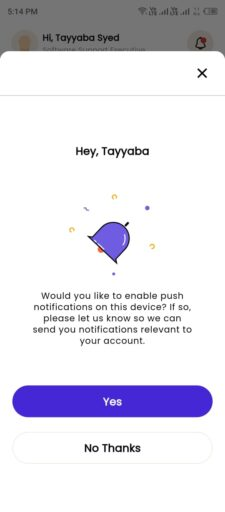
Getting Started: Notification Preference After Login in PayPeople App (screen 3)

How to Sign Out from the PayPeople App

To log out from the PayPeople app, follow these simple steps:

  • Access the Profile Section:
    • From the Home Screen, tap on the Profile Section located at the top.
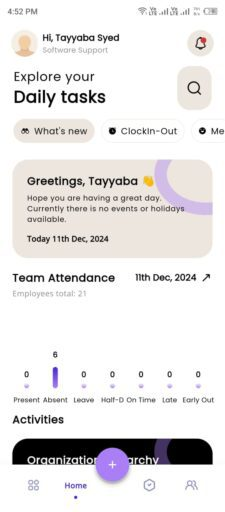
Getting Started: How to Sign Out from the PayPeople App (screen 4)

  • Find the Log Out Option:
    • Within the profile settings, click Sign Out or Log Out button.
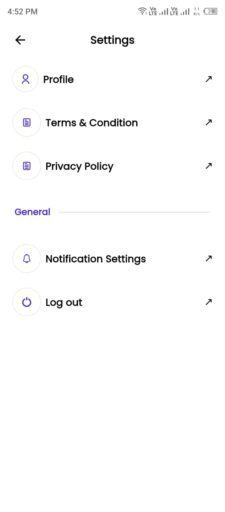
Getting Started: How to Sign Out from the PayPeople App (screen 5)

  • Confirm Sign Out:
    • A confirmation popup will appear.
    • Tap the Log Out button to confirm and complete the process.
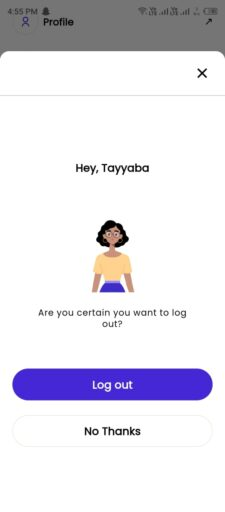
Getting Started: How to Sign Out from the PayPeople App (screen 6)

You will then be securely logged out of the PayPeople app.

Subscribed Client Operational Run Assistance

Executing this payroll run or configuring your biometric machines? Connect with our dedicated Client Operations Desk on WhatsApp (please have your Organization ID ready).

Client Desk
Was this documentation guide helpful?

Your feedback helps our product and documentation teams continuously improve these instructions.

Based on verified PayPeople system workflow. View original help center article

Enterprise Guidance & Configuration

Need direct assistance implementing this workflow?

Our payroll operations team helps configure multi-branch biometrics, complex FBR tax rules, and custom shift schedules for your team.