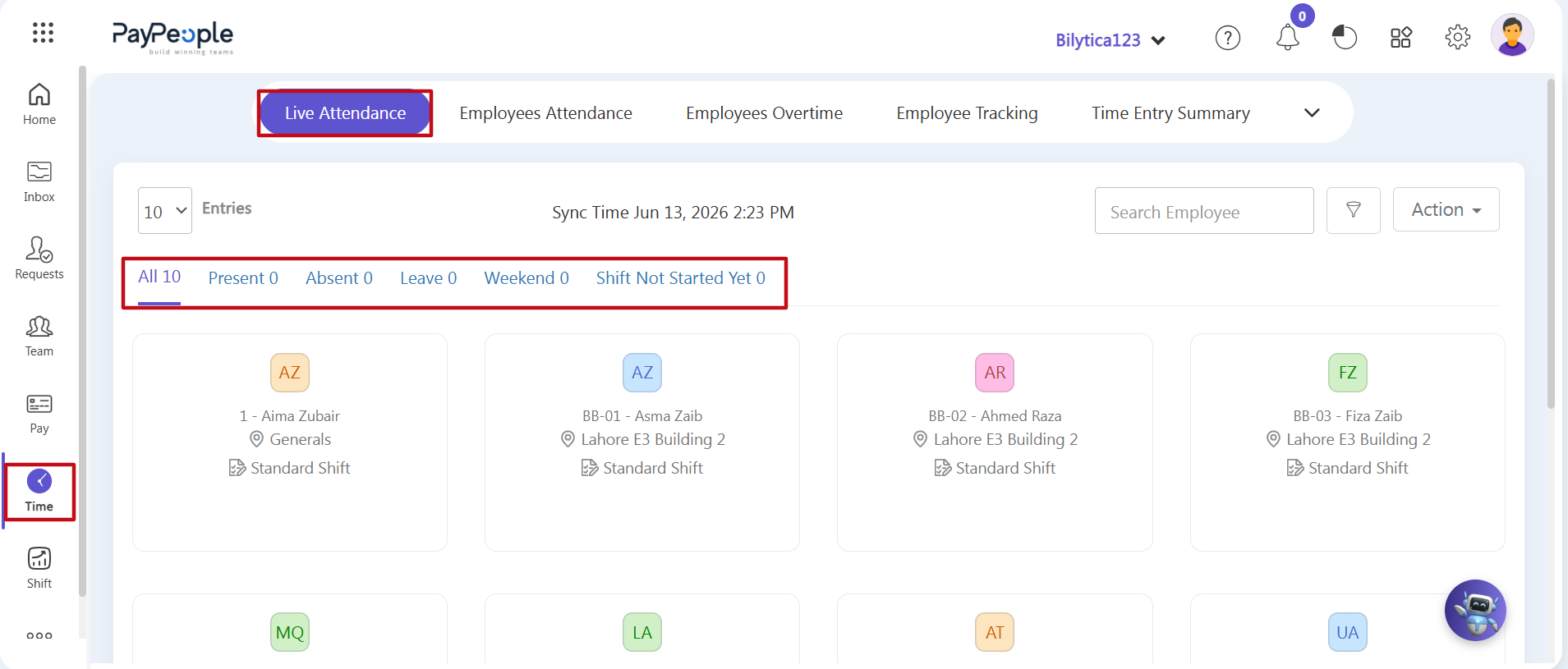
To check daily live attendance, follow the steps:
Step 1: Open the Time Module — Go to the main left-hand navigation bar and click on the purple Time icon button (marked with a red box).
Step 2: Go to the Live Attendance Screen — Click on the first sub-tab at the top titled Live Attendance (marked with a red box). This screen automatically refreshes its numbers every 15 minutes with fresh data from your active networks.
Step 3: Check Your Real-Time Numbers — Look at the horizontal data tracking bar at the top (marked with a red box) to review your daily team metrics at a glance:
- All: Shows the total number of employees assigned to a shift today.
- Present / Absent / Leave: Tracks exactly who is currently clocked in, marked absent, or away on an approved leave.
- Weekend: Shows the total number of staff members scheduled for a day off today.
- Shift Not Started Yet: Displays the number of scheduled workers whose shift start times haven't opened up yet.