

Tracking company loans, salary advances, and monthly recoveries requires real-time balancing that links directly with your payroll cycles. The PayPeople platform provides a centralized tracking panel where administrators can monitor active loans, review installment details, and connect new requests directly to backend approval workflows.
1. Auditing the Loan & Advance Recovery Ledger
To track outstanding loan statements and check ongoing monthly deductions:
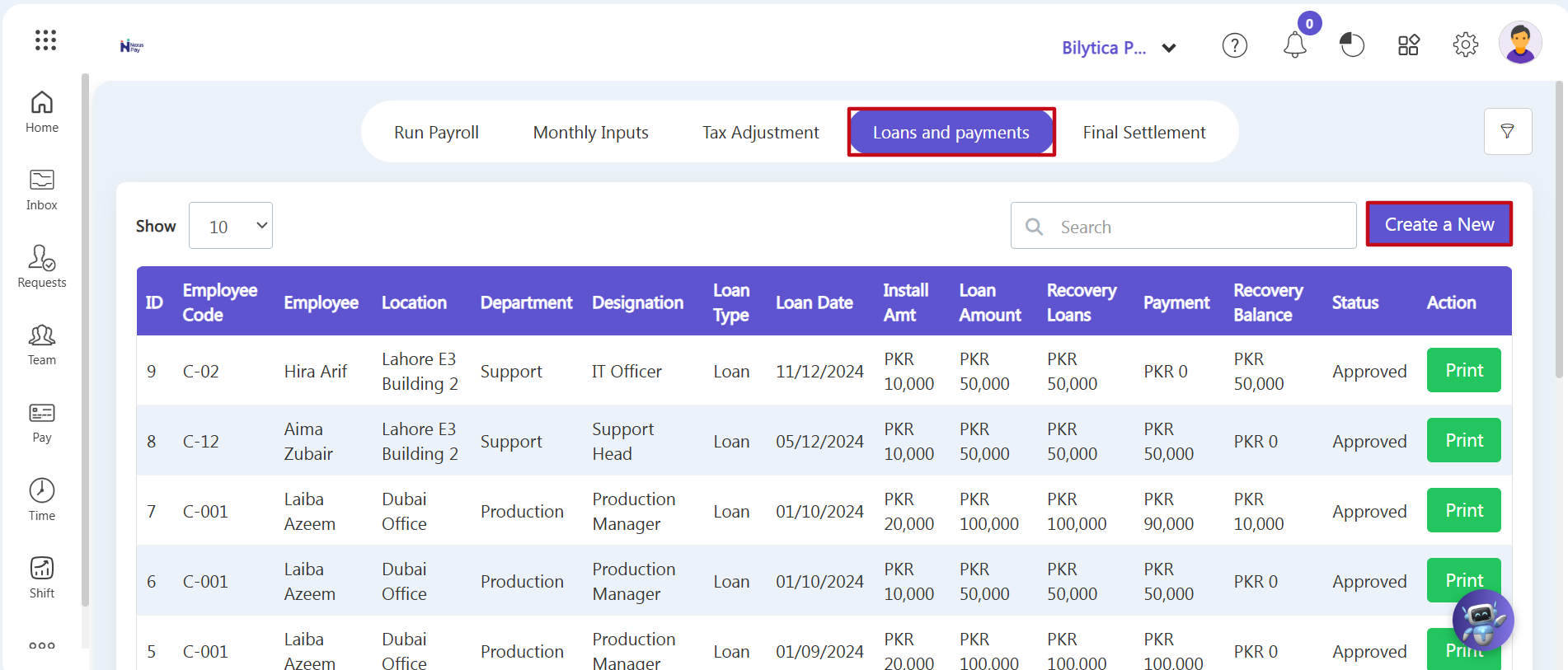
- Step 1: Open Loans and Payments — Go to the main left-hand vertical menu and click on the Pay module. Look at the top horizontal menu and click on the fourth tab labeled Loans and payments (marked with a red box).
- Step 2: Check Employee Loan Metrics — The main loan ledger grid will open, showing all active records. Review the tracking columns to check current balances across your team:
- Loan Amount & Date: Shows the total principal amount approved along with the original issue date.
- Install Amt & Recovery Loans: Displays the exact monthly installment amount deducted automatically, alongside the total amount recovered so far.
- Payment & Recovery Balance: Tracks any manual, out-of-cycle payments and shows the remaining outstanding balance owed to the company.
- Step 3: View and Print Ledger Statements — Find the specific employee's row and click the green Print button under the Action column. This opens a detailed, itemized statement showing total loan amounts, past recovery history, and the final remaining balance.
2. Setting Up and Routing New Loan Requests
To log a new loan or salary advance using integrated approval workflows:
- Step 4: Open the Request Wizard — Click the purple Create a New button (marked with a red box) at the top right of the ledger page.
- Step 5: Fill out Request Details — The system will open the Funds dashboard in the Requests section. Select the employee, enter the total loan amount, set the number of monthly installment payments, and add a brief reason for the request.
- Step 6: Submit for Approval — Click submit to route the request through your company’s approval chain. Once approved, the system automatically adds it to the Loans and payments ledger and begins deducting monthly installments in active payroll runs.
Loan Recovery Reconciliation Pro-Tip: |